 Rahul Somvanshi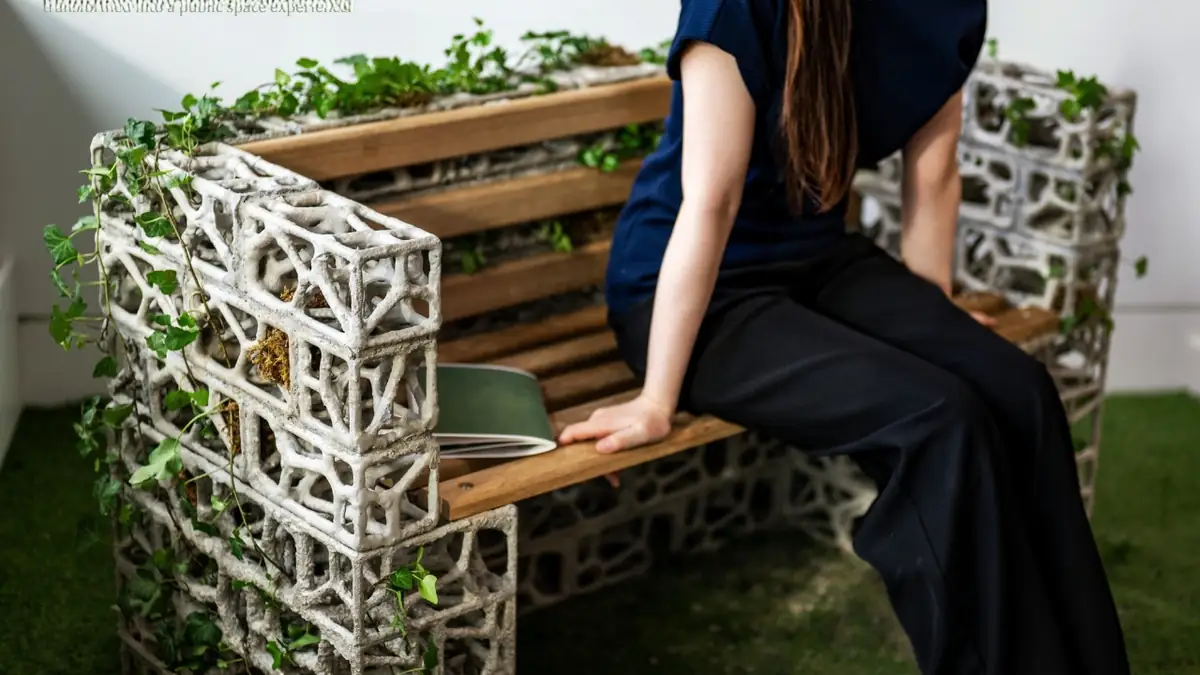
This Living Bench Uses Ivy to Change How Public Furniture Grows
Most park benches are finished the day they leave the workshop. The PhytoSymbiosis Seat is designed as a living public-furniture concept whose form can continue changing as the ivy grows — guided by whoever tends it.
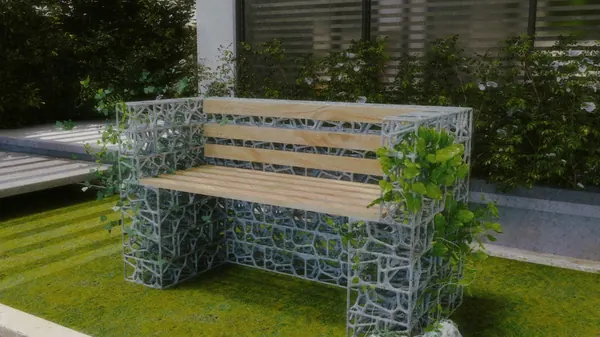
The PhytoSymbiosis Seat is a public furniture concept developed at the Royal College of Art that won a Silver at the 2026 New York Product Design Awards. The design uses a bio-concrete frame with a porous internal structure based on Voronoi geometry — a mathematical pattern derived from botanical growth patterns — to create a porous surface designed to accommodate the plant’s growth and climbing behaviour. English ivy is the specified plant. The bench’s final form depends partly on where it is installed and on how people interact with it after installation.
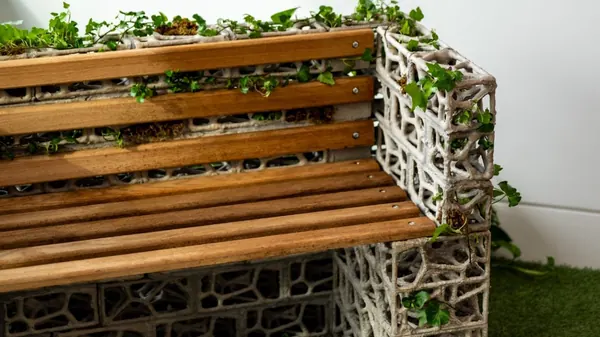
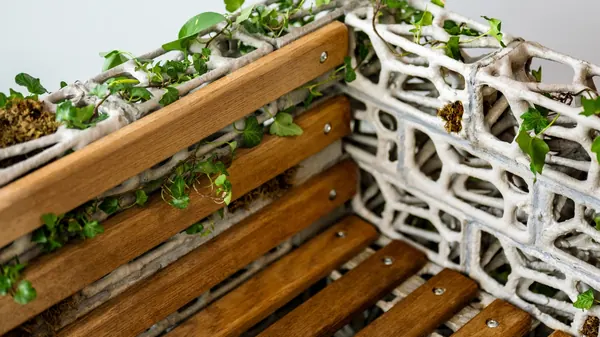
For city planners and designers thinking about public furniture’s role in urban biodiversity, the PhytoSymbiosis Seat introduces a different premise: the bench is not an object delivered in a finished state but one that continues developing through use and care. Watering and guiding the plant’s growth become part of the furniture’s lifecycle. That places the bench closer to sustainable urban design that treats biological integration as a feature rather than a maintenance problem.
How the Design Works
The parametric frame uses Voronoi-based geometry derived from botanical growth patterns. Over time, the plant’s growth engages with the structure. The project documentation says ivy attaches to the concrete through natural root adhesion and is intended to form a composite structure with the frame.
The project uses bio-concrete bricks with a porous surface structure designed to support English ivy.
The design specifies English ivy, which grows in temperate climates and adheres to hard surfaces. It is commonly used in urban green design and is well suited to outdoor installations.
The design documentation tied to the NY Product Design Awards places the bench in community spaces where people have a returning relationship with the installation: a courtyard, a school garden, a neighborhood green. An installation in a high-footfall transit environment with no one managing the plant would produce a different result than one in a cared-for community setting. The interaction model is central to how the design functions.
Figures circulating in design publications about participation rates and emissions reductions associated with the project come from the project’s own documentation rather than independently validated scientific studies. They should be read as design-research claims rather than externally reviewed findings.
The name combines “phyto” (plant) and “symbiosis” (mutual benefit between organisms). It refers to the design relationship between the plant and the concrete structure. It is not a reference to “phylosymbiosis,” a separate concept in evolutionary biology describing how microbial communities track host phylogeny. The names are similar; the fields are unrelated.
Sustainable public furniture is a growing research area, with designers testing mycelium composites, reclaimed timber, and living-plant integrations alongside conventional materials. The PhytoSymbiosis Seat is a design-award project, not a product in commercial production. The Royal College of Art’s documentation is the primary source for the project’s specifications and stated intent.
———————————————————————————————–
———————————————————————————————–
## How to Log Into WordPress REST API — Step by Step
### What We Used: **Application Password Authentication**
—
### Step 1: Get the Credentials
From the Pipeline file (`Karmactive Pipeline.md`), the credentials are:
– **Username**: `Sunita Somvanshi`
– **Application Password**: `Tw8QKhc98KxU5L4O3Q0s0w6J` (remove spaces → `Tw8QKhc98KxU5L4O3Q0s0w6J`)
> Application Passwords are created in WordPress Admin → **Users → Profile → Application Passwords** section. They’re separate from the login password and designed for API access.
—
### Step 2: Test the Login (Verify It Works)
“`bash
curl -s -u “Sunita Somvanshi:Tw8QKhc98KxU5L4O3Q0s0w6J” \
“https://www.karmactive.com/wp-json/wp/v2/users/me?_fields=id,name”
“`
**Expected response**: `{“id”:57,”name”:”Sunita Somvanshi”}` ✅
—
### Step 3: Make Authenticated API Calls
**GET a post** (read):
“`bash
curl -s -u “Sunita Somvanshi:Tw8QKhc98KxU5L4O3Q0s0w6J” \
“https://www.karmactive.com/wp-json/wp/v2/posts/1779?_fields=id,title,author”
“`
**PATCH/UPDATE a post** (write):
“`bash
curl -s -X POST \
-u “Sunita Somvanshi:Tw8QKhc98KxU5L4O3Q0s0w6J” \
-H “Content-Type: application/json” \
-d ‘{“meta”:{“_yoast_wpseo_focuskw”:”your keyword here”}}’ \
“https://www.karmactive.com/wp-json/wp/v2/posts/1779”
“`
> Note: WordPress REST API uses `POST` for updates (not `PATCH`), even when editing existing posts.
—
### Step 4: Check the HTTP Response Code
– **200** = Success ✅
– **401** = Auth failed (wrong credentials)
– **403** = Forbidden (user doesn’t have permission)
– **404** = Post not found
—
### How It Works Under the Hood
“`
curl -u “username:app_password”
↓
WordPress sees Basic Auth header
↓
Checks Application Password table (not login password)
↓
Grants API access with that user’s role/capabilities
↓
Sunita = Editor role → can edit any post ✅
“`
—
### Why This Works Now (But Failed Before)
The previous sessions used:
– ❌ Regular WP login password → blocked by Cloudflare WAF
– ❌ Programmatic browser login → WAF blocks `POST /wp-login.php`
– ✅ **Application Password** → bypasses WAF, goes directly to REST API endpoint, which Cloudflare allows through
—