Karmactive Team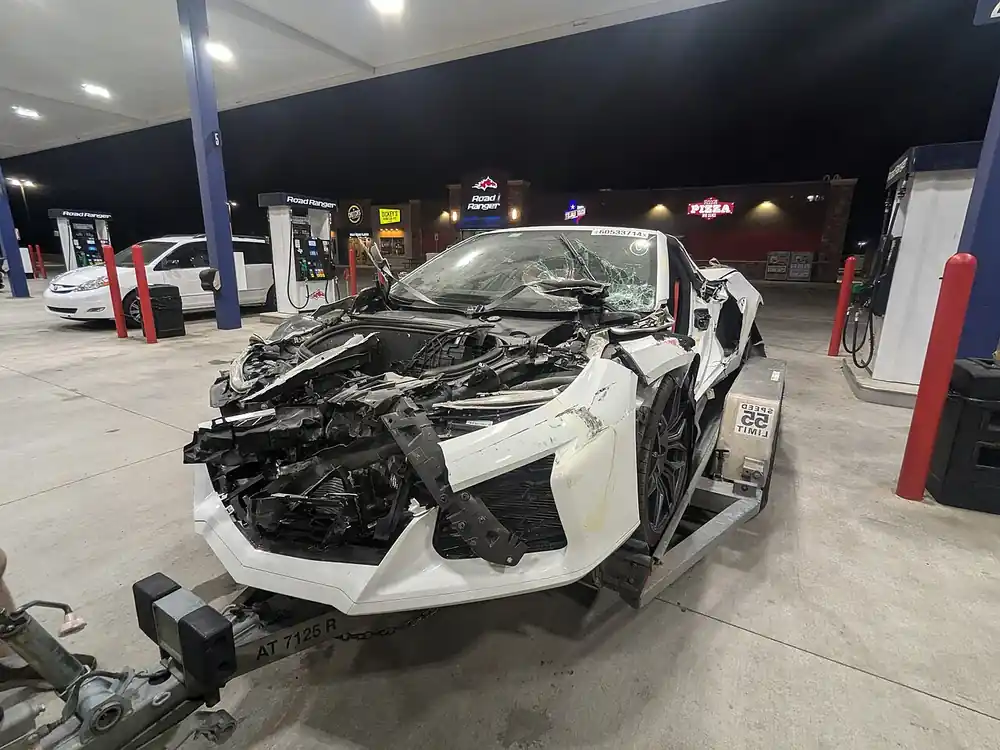
Corvette Test Drive Crash: Canadian Buyer Ordered to Pay C$17,182 After Arguing a Test Drive Made Him a “Dealership Employee”
Thinking about a test drive in a new sports car? A Canadian buyer learned who pays when things go wrong. After striking a concrete barrier with a new Corvette at a truck stop, he argued in court that the test drive made him a dealership employee. The courts ruled against him, and he was ordered to pay C$17,182.23.
Kirby Sewell ordered a new C8 Chevrolet Corvette Stingray from Gardner Chevrolet Buick GMC in Hope, British Columbia, in 2024. On June 12, 2024, he was allowed to take the car for a test drive. He had pulled over at a Flying J truck stop to take photos. When he tried to move the car, he struck a concrete barrier. He walked away from the purchase and refused to pay for the damage. A 2025 small claims judgment ordered him to pay C$17,182.23 for repairs, lost value and interest. In October 2026, the Supreme Court of British Columbia dismissed his appeal. For background on the car, see our Chevrolet Corvette coverage.
The dealership in this case was awarded compensation for repairs and for diminished value, the loss in the car’s resale worth after an accident. Read the waiver before you take the keys.
His argument relied on section 86 of British Columbia’s Motor Vehicle Act. Under his reading, a person driving with the owner’s consent would be treated as the owner’s agent or employee. The appeal judge said the provision is aimed at protecting innocent third parties, not negligent drivers. The award covered repairs, lost value and interest.
Sewell’s award covered repairs and lost value on a new car, according to reporting.
Who is financially responsible if you crash a car on a test drive?
In this case, a British Columbia court ordered the driver to pay for the repairs and lost value after he damaged the car on a test drive. The court’s reasoning turned on the Motor Vehicle Act, so the outcome may not apply in other places.
Before you sign a dealership’s test-drive form, read the waiver and check your personal auto policy’s limits. A British Columbia court ordered a test driver who damaged a car to pay C$17,182.23 for repairs and lost value.
\———————————————————————————————–
\———————————————————————————————–
## How to Log Into WordPress REST API — Step by Step
### What We Used: \*\*Application Password Authentication\*\*
\—
### Step 1: Get the Credentials
From the Pipeline file (\`Karmactive Pipeline.md\`), the credentials are:
\- \*\*Username\*\*: \`Sunita Somvanshi\`
\- \*\*Application Password\*\*: \`Tw8Q Khc9 8KxU 5L4O 3Q0s 0w6J\` (remove spaces → \`Tw8QKhc98KxU5L4O3Q0s0w6J\`)
> Application Passwords are created in WordPress Admin → \*\*Users → Profile → Application Passwords\*\* section. They’re separate from the login password and designed for API access.